


VMWare Technology Monitoring
VMWare specializes in virtualization software and cloud computing solutions. It is a major player in the field of IT infrastructure, enabling companies to optimize the use of their hardware resources through virtualization.

OVERVIEW
Understanding VMWare
Virtualization uses a software layer to create an abstraction between the physical hardware and the operating systems running on it. This technology allows a single physical server to be divided into multiple Virtual Machines (VMs), each operating independently with its own operating system and applications.
VMWare’s main products include:
- VMware vSphere: A comprehensive software suite for managing virtual infrastructure, including ESXi and vCenter Server (centralized management, automation, monitoring, clustering, high availability, etc.).
- VMware ESXi: The core of enterprise virtualized infrastructures. It is a Type 1 or “bare-metal” hypervisor that interacts directly with the underlying physical resources, completely replacing the traditional operating system. Since vSphere 8, it replaces the older ESX, no longer requires a Linux kernel, making it lighter and more secure.
- VMware vCenter: A centralized management tool for virtualized environments, enabling the administration, automation, and supervision of server clusters and virtual machines. It provides centralized management for ESXi hosts and VMs, among other functions.
- VMware Workstation and Fusion (VDI): Desktop virtualization solutions that allow running multiple operating systems on a single personal computer.
Why VMWare Monitoring is Necessary
Monitoring VMWare is essential to guarantee the performance, availability, security, and optimization of virtualized environments. These elements have become critical for business operations. Here is a list of solutions provided by monitoring:
- Assist with Planning and Cost Management: Historical analysis of monitoring data allows for forecasting future needs, anticipating load changes, and optimizing hardware or software investments.
- Prevent Interruptions and Quickly Detect Incidents: A failure or slowdown on a VMWare host impacts all hosted virtual machines, which can lead to the unavailability of essential services. Monitoring allows for real-time alerts in case of an anomaly (CPU overload, hardware failure, network issue, etc.) and intervention before users are affected.
- Optimize Resource Utilization: Monitoring tools analyze CPU, memory, storage, and network usage. They help prevent over- or under-allocation of resources, detect resource-intensive or unused virtual machines, and dynamically adjust capacity based on actual needs.
- Ensure Infrastructure Stability and Performance: Monitoring helps identify bottlenecks, check the health of datastores and the hypervisor, and ensure that performance remains optimal even during peak activity.
- Facilitate Problem Diagnosis and Resolution: In the event of an incident, monitoring provides precise data to quickly isolate the cause (hypervisor, storage, network, VM, etc.), accelerating the return to normal and limiting the impact on business.
- Strengthen Security: Monitoring tools can detect abnormal behavior or unauthorized access attempts, contributing to system protection against internal or external threats.
HOW WE HELP
Our Proposal: Deploying Simplified Integration for your VMWare Resources
Centreon offers a VMWare monitoring solution that covers the key services of a VMWare infrastructure, based on ready-to-use connectors.
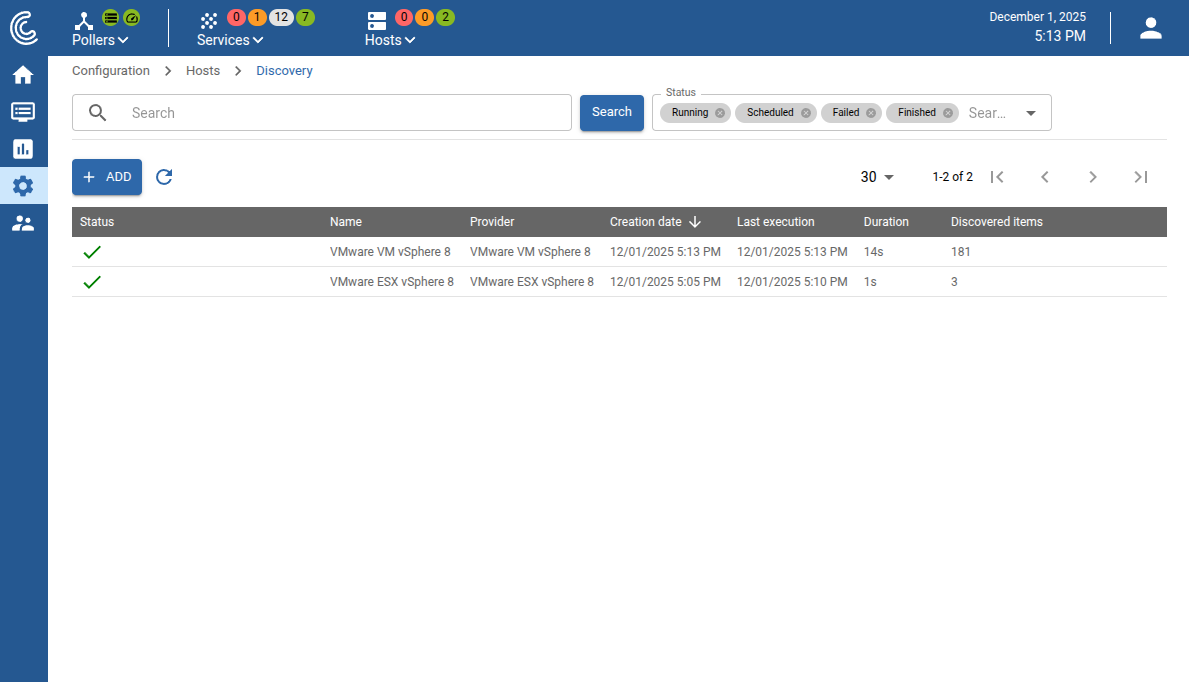
- Automatically discover VMWare resources to simplify the deployment of your monitoring.
- Establish standardized monitoring policies that are consistent across all monitored resources. This ensures the correct metrics are collected from deployment and reduces manual configurations.
- Acquire visualization tools (customizable dashboards and event logs) that provide a complete view and follow-up (real-time and historical) of the metrics associated with your VMWare resources.
- Implement alerts and automated actions that trigger when certain pre-established threshold conditions are met. This allows for continuous and proactive incident management.
Automated Monitoring of your VMWare Resources with Centreon
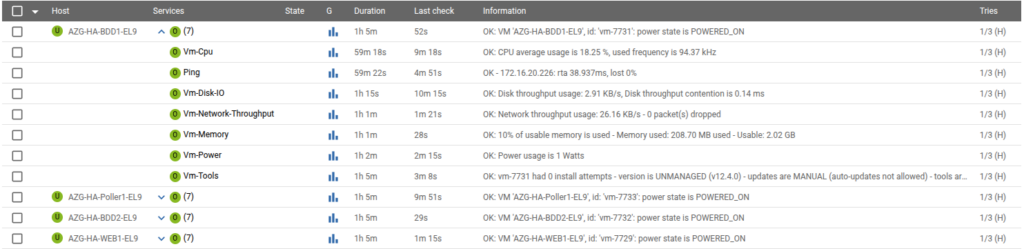
Centreon offers VMWare connectors that support the monitoring of numerous metadata and performance metrics to ensure proactive monitoring. They automatically discover resources such as ESX hosts and Virtual Machines (VMs).
Centreon’s monitoring helps answer concrete questions such as:
- What is the status of my physical ESXi server (CPU, Disk-IO, memory, swap, network traffic statistics, and power consumption)?
- Within vCenter: What is the health status of a Cluster? How many VMs are running on this server and what is their status? What is the storage utilization (datastores)?
- For a given VM: What is its status and its performance metrics (CPU, Disk-IO, memory, network traffic statistics, power consumption, and metrics associated with the tools)?
Customizable Dashboards
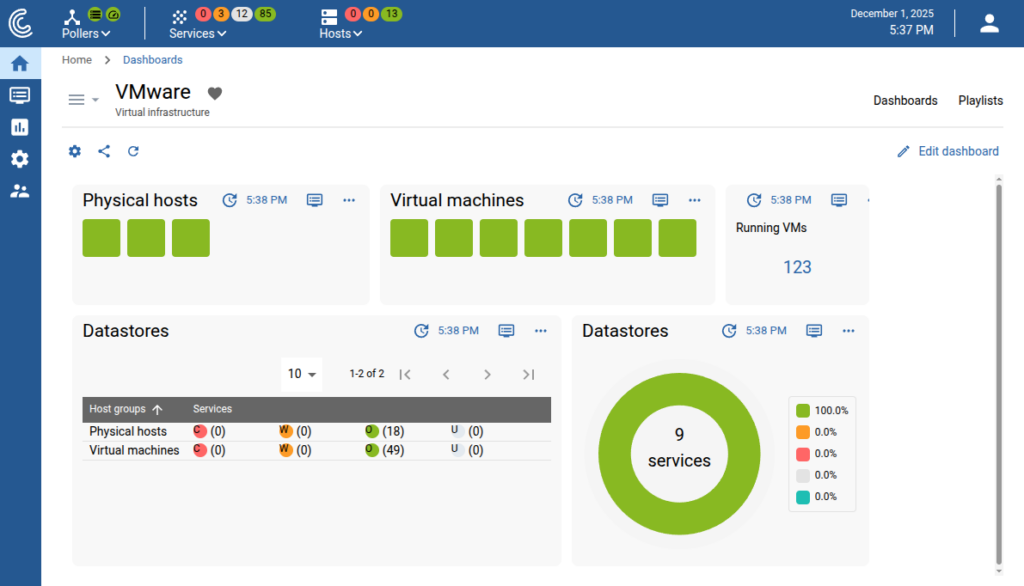
Once VMWare metrics are integrated into Centreon, they can be visualized using the full range of tools developed to meet various use cases:
- Customizable dashboards make it possible to display key metrics through interactive dashboards, diagrams, and application maps. This allows teams to monitor the performance and health of the VMWare infrastructure.
- Business Activity Monitoring (BAM) diagrams add context to the tracked metrics by enabling organizations to link performance data to business outcomes. These diagrams are particularly useful for highlighting critical problems and filtering less urgent alerts.
- Service weather maps link operations centers to the health statuses of critical services. The established overview allows for a quick assessment of your resources’ operational status.
Simplified Incident Management and Alerts
It is possible in Centreon to configure alerts directly triggered by data from VMWare 8 services, in order to react quickly when an incident occurs:
- Custom notifications allow configuring alerts via email or integrated into incident management platforms such as PagerDuty (as well as Slack and Microsoft Teams). This ensures that critical alerts are processed quickly and by the right people.
- Automated actions are based on triggered alerts to automate certain responses under specific defined conditions (for example, a threshold overshoot for a metric). This helps maintain service stability and continuity by reducing the need for manual interventions.
CENTREON BENEFITS
Centreon Benefits for VMWare Monitoring

Automatic Discovery
By combining Centreon’s Auto-Discovery feature with the dedicated VMWare monitoring connectors, your monitoring remains complete and easy to manage.
Zero-Config Connectors
VMWare is just one technology among many. Centreon’s intelligent auto-discovery features, coupled with the more than 700 zero-config connectors, enable quick and easy implementation for numerous resources.
Align IT and Business
Centreon promotes excellence in business performance, aligning IT operations with business growth objectives through intuitive monitoring.
More from Centreon



Ready to see how Centreon can transform your business?
Keep informed on our latest news