

Starting with version 26.10, you can deploy a Centreon Infra Monitoring poller as containers with a single command. The feature ships as a beta. To get it ready for general availability (GA), we’re launching an open beta program on The Watch, the Centreon community. Try it out, tell us what you think, and help shape our priorities with your use cases. This post covers what’s available today, how the program works, and how to join.
Why containerize your pollers?
For monitoring teams, the hardest part isn’t always the monitoring itself. Often, it’s keeping the monitoring tool running. Installing a poller means preparing an operating system, managing repositories and packages, then doing it all over again with every update, at every site.
Meanwhile, your infrastructure is moving to containers. Docker has become a standard way to deploy services, including at remote sites, plants, and branch offices. Your monitoring needs to keep up.
First announced at Centreon Summit 2025, containerized pollers are our answer. They reflect what Centreon Infra Monitoring stands for: an open, scalable IT monitoring platform that adapts to your hybrid IT environment, not the other way around.
What you get:
- No OS dependency: no more packages or system dependencies to manage on the host.
- Simpler updates: updating a poller is just a matter of pulling the new image and swapping it in for the old one.
- A natural fit: your pollers slot right into your existing container environments and automation workflows.
How does it work?
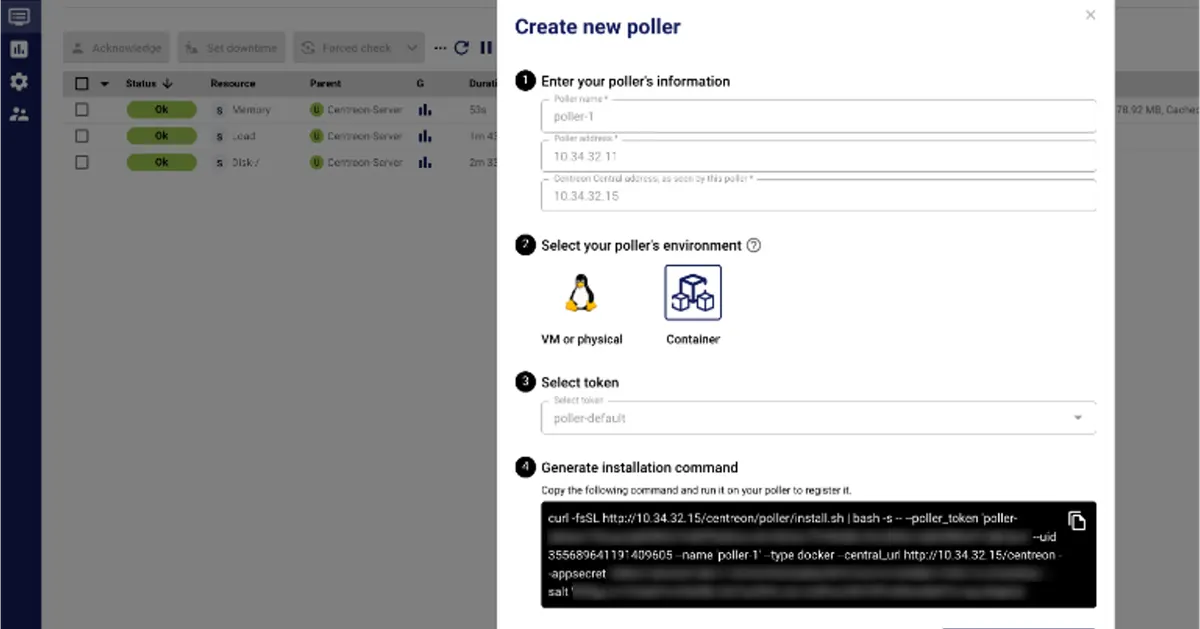
Deploy a poller with a single command
Deployment relies on Docker Compose and takes just a few steps:
- In the Centreon interface, open the Create new poller wizard and create your poller.
- Copy the generated installation command.
- Run it on a Linux host with Docker and Docker Compose installed.
- Check the interface to confirm your new poller is up and running.
The script deploys two dedicated containers: one for the monitoring engine (Centreon Engine) and one for external commands (Gorgone).
Optional services when you need them
You can turn on additional services using script options:
- SNMP trap reception (snmptrapd and centreontrapd)
- VMware monitoring (centreon-vmware)
- Centreon Monitoring Agent (CMA)
Your custom plugins still work
Using your own plugins? You have two options:
- The lightweight approach: mount your plugins and their dependencies as local volumes.
- The advanced approach: build your own image on top of ours.
For full installation details, the official documentation remains the go-to reference.
The beta program: why, and who it’s for
The program kicks off with Centreon Infra Monitoring 26.10 and runs until GA. The goal: put the feature through its paces in real, diverse environments, and improve it alongside the people who’ll use it every day.
Who can join?
Any Centreon Infra Monitoring user who wants to try containerized pollers, whether you already know your way around Docker or you’re thinking about modernizing your monitoring architecture. The requirements are simple:
- A central server running version 26.10.x
- A Linux host with Docker and Docker Compose
- An FQDN for the peer address (certificates aren’t generated for IP addresses)
What we’re asking of you
- Test it in a lab or non-critical environment, and keep your traditional pollers running alongside.
- Share your feedback, whether everything works or something breaks. Include your OS, your container runtime and its version, your architecture, and the options you used.
- Tell us about your use cases: do you need Kubernetes or Podman? Do you rely on lots of custom plugins? Do you have security requirements such as hardened images?
- Contribute: suggestions on the documentation, scripts, and Compose files are always welcome.
What we commit to
- Answering your questions in the group within 5 business days.
- Keeping you posted on fixes, new 26.10.x releases, and the GA date.
- Using your feedback to set our priorities through GA.
Current limitations and roadmap to GA
This is a beta, so some features aren’t there yet. Here’s where things stand.
| Today in 26.10 (beta) | Planned by GA |
|---|---|
| Docker Compose only | Podman support and Helm charts for Kubernetes |
| Pollers can only be linked to the central server | Support for linking pollers to a remote server |
| CMA certificates must be provided manually | Automatic CMA certificate generation in an upcoming 26.10.x release |
| Options (SNMP traps, etc.) must be added to the command | More options available directly in the wizard |
| Re-running the script overwrites the existing configuration | Safe re-runs that create .new files |
| Standard base images | Hardened images, currently under consideration |
Please note: we don’t recommend using containerized pollers to monitor business-critical production environments during the beta, and they aren’t covered by the standard support SLA. The group on The Watch is the dedicated channel for your questions.
How do I join the beta on The Watch?
Everything happens in the Centreon Infra Monitoring - Pollers in containers group on The Watch. Our product and R&D teams keep a close eye on it.
- Join the group using your account on The Watch (or create one for free).
- Read the introductory posts: the program overview, the beta charter, and the Getting started guide.
- Deploy your first containerized poller by following the guide and the documentation.
- Share your feedback and ask your questions directly in the group.
Make it a habit: before posting logs or screenshots, strip out any secrets (tokens, keys, certificates) and internal hostnames.
What’s next? The central server
Pollers are just the beginning. Our teams are already working on containerizing the central server, so that you’ll eventually be able to deploy and scale your entire Centreon Infra Monitoring platform the same way you manage the rest of your IT environment.
The feedback gathered during this beta will feed directly into that work: your architectures, security constraints, and runtime environments help us build what comes next. We’ll share the next steps with the community on The Watch as soon as they’re ready.
FAQ
Can I use containerized pollers in production?
During the beta, we don’t recommend using them to monitor business-critical production environments. The installation script, the generated command, and the Compose files may still change between 26.10.x releases. Any major change will be announced in the group and in the release notes.
Which container runtimes are supported?
In 26.10, only Docker Compose is supported. Podman support and Helm charts for Kubernetes are planned by GA.
Can I link a containerized poller to a remote server?
Not yet. In 26.10, the wizard links new pollers to the central server only. Linking to a remote server is on the roadmap to GA.
How do I update a containerized poller?
Simply pull the new image and run it in place of the old one. Be careful: in 26.10, re-running the install.sh script overwrites your existing configuration, so back up your files first.
Does Centreon Support cover the beta?
Beta features aren’t covered by the standard support SLA. Rather than opening a ticket, reach out in the group on The Watch: our teams respond within 5 business days.
Help us build containerized pollers
Your feedback will turn this beta into a feature that’s ready for your production environments. Join the Centreon Infra Monitoring - Pollers in containers group on The Watch today, deploy your first containerized poller, and let us know what you think.
New to Centreon Infra Monitoring? Ask for a demo and see how you can monitor your entire hybrid IT environment from a single platform.