

Centreon Infra Monitoring 26.10: an LTS release built to make deployment, security, and operations simpler
Centreon Infra Monitoring 26.10 is our second Long Term Support (LTS) release, and it comes with three years of support. That gives your teams a stable foundation for IT monitoring through 2029, with no major upgrade required along the way.
This release delivers on three things our users have been asking for:
- Simpler deployment: install a new poller or agent with a single command, including as containers.
- A more secure platform: every connection to the database can now be encrypted with TLS.
- Faster configuration and day-to-day operations: model business activities (BAM) in a single interface and test them before they go live.
As a core component of the Centreon Observability Platform, Centreon Infra Monitoring 26.10 also gets a fresh look, faster performance, and a long list of community-requested improvements. Here’s what’s new, and what it means for you.
Deploy a poller with a single command
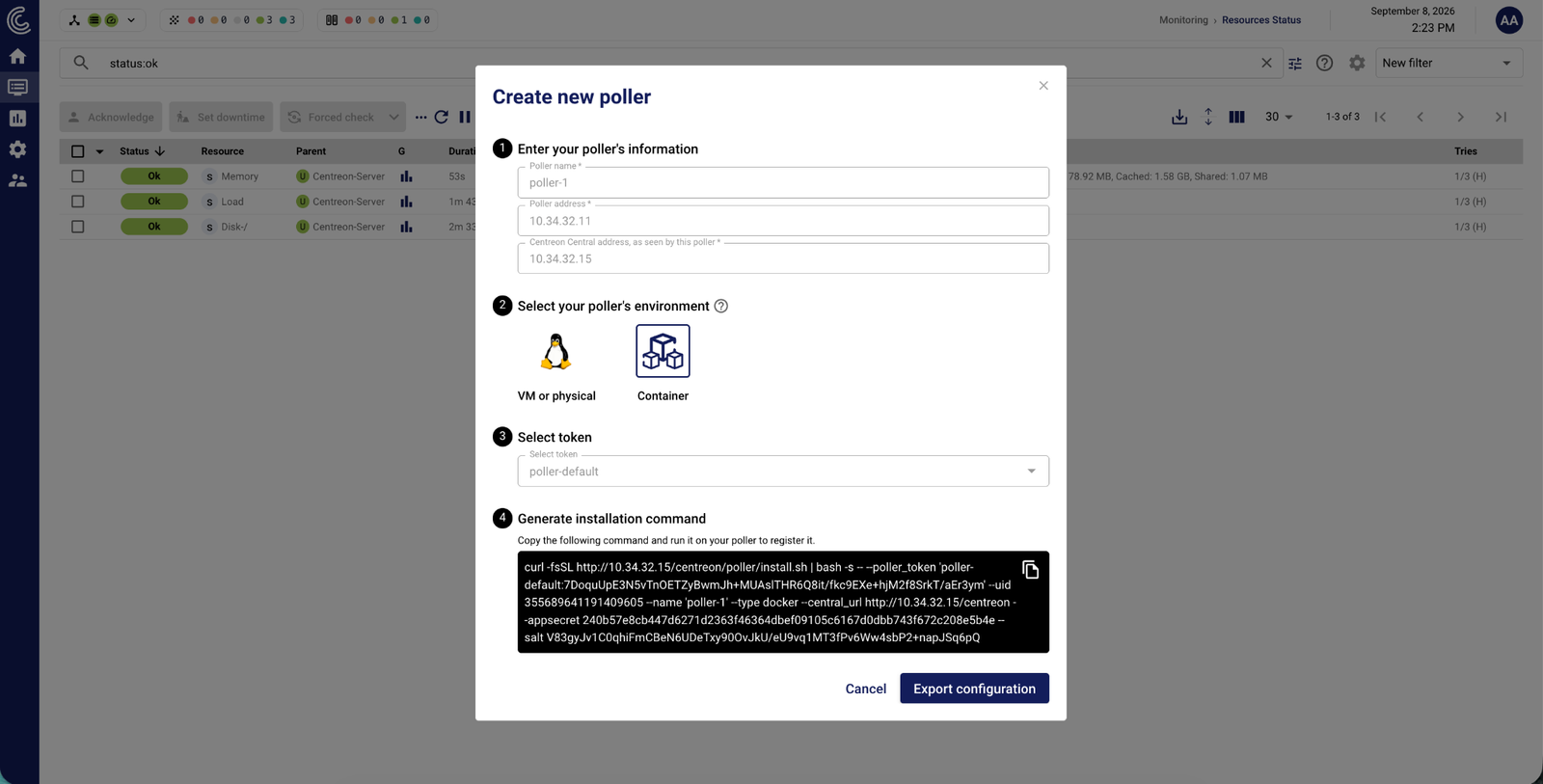
With 26.10, adding a poller to your monitoring platform takes minutes instead of a series of manual steps. A new button in the monitoring servers section of the header walks you through it in just a few clicks:
- Enter the poller’s name, its IP address, and the central server address as seen from the poller.
- Choose the installation type: packages (physical server or virtual machine) or containers.
- Select the token the poller will use to authenticate with the central server. Tokens are generated automatically.
- Copy the generated command and run it in the target environment.
Your poller is now ready to start monitoring its first resources.
Why it matters:
- Less time, fewer errors: no more following an OS-specific installation procedure step by step.
- Easier updates: the same command, always available from the Configuration > Pollers > Pollers menu, can be run again to update the poller.
- Easier scaling: bringing a new site or environment under monitoring becomes routine.
Containerized pollers
Announced at Centreon Summit 2025, containerized data collection is here. When you choose the container option, the command generates a Docker Compose file that runs two containers: one for data collection and one for external commands (Gorgone).
Why it matters: you no longer depend on a specific operating system or have to manage packages. Updating a poller is as simple as pulling the new image and replacing the old container. Your pollers also fit right into the container environments you already run.
Centreon Monitoring Agent: automatic installation and registration
The same approach now applies to Centreon Monitoring Agent (CMA), Centreon’s monitoring agent. These improvements are also available from Centreon Infra Monitoring 25.10.14:
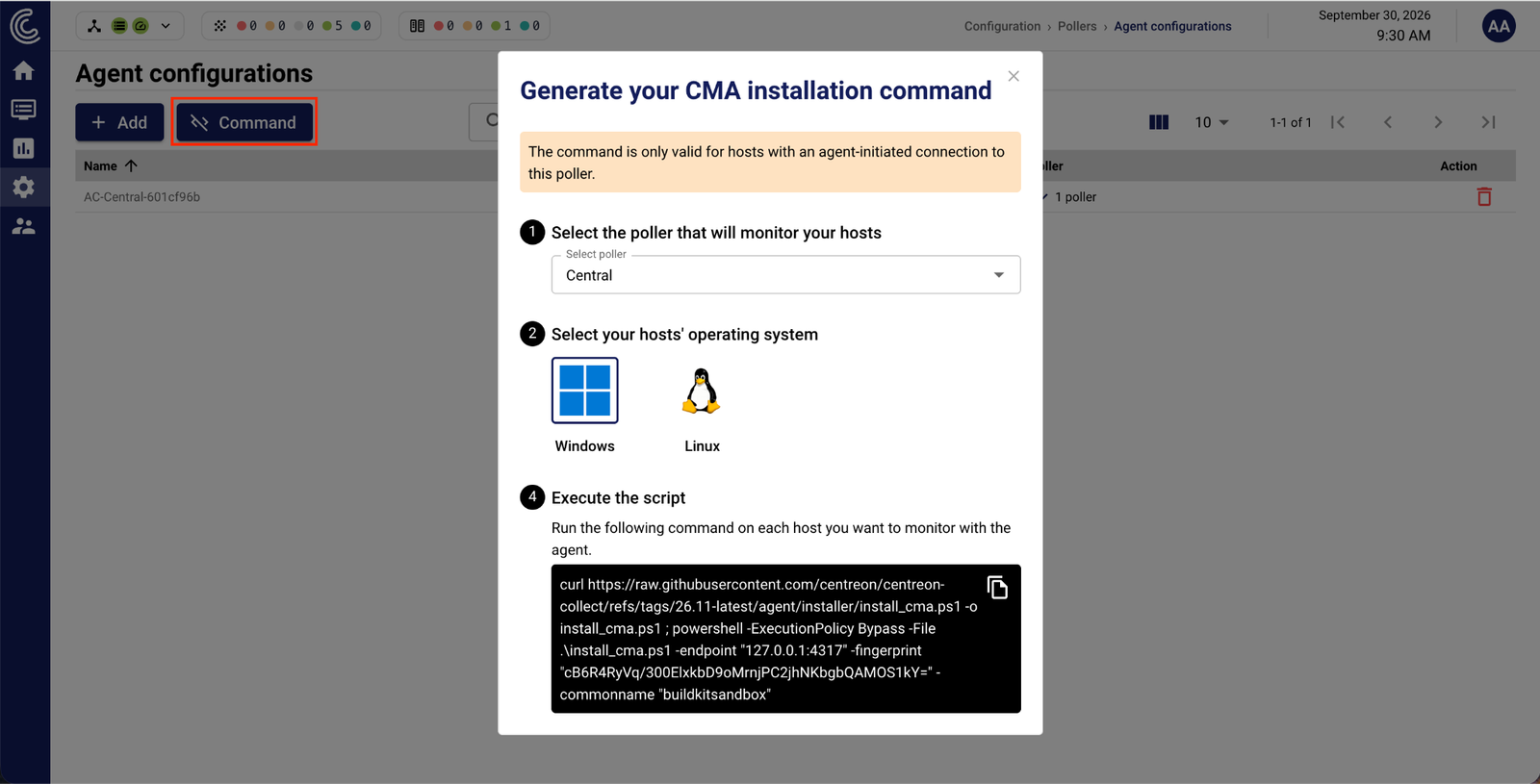
- A ready-to-run installation command for Windows and Linux, available from Configuration > Pollers > Agent configurations (Command button), which you can roll out through GPO or your usual automation tool.
- Automatic host registration: once the agent is installed, the host is added to your configuration and its data shows up on the Resources Status page within seconds.
- Self-signed certificates generated by the platform: communications stay TLS-encrypted and agents authenticate with a JWT token, with no certificate infrastructure to manage.
Why it matters: you can extend monitoring across your entire server fleet without any manual configuration, while keeping every connection secure.
A more secure platform: every database connection encrypted with TLS
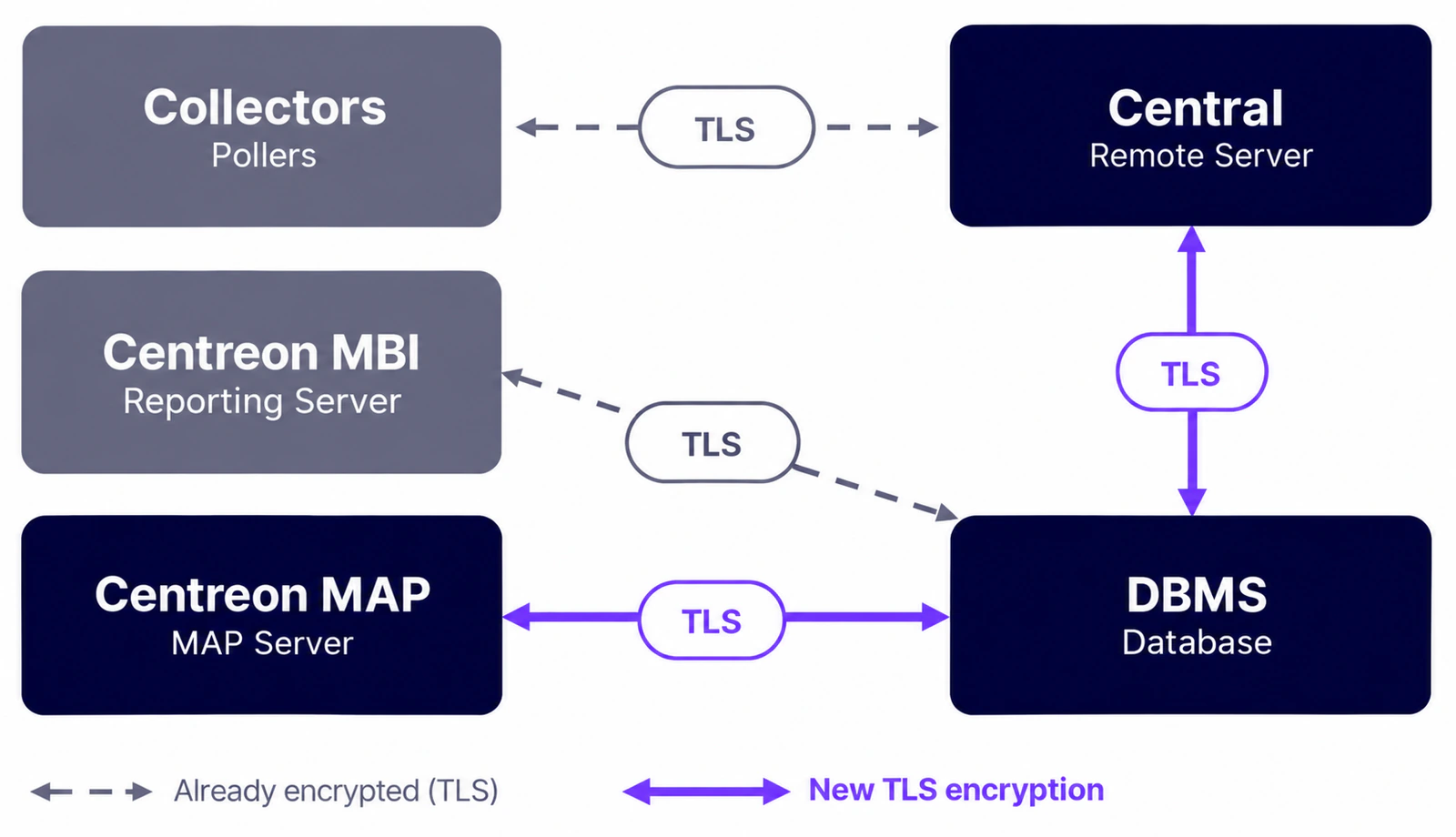
With 26.10, all traffic between Centreon Infra Monitoring components and the database management system (DBMS) can be encrypted with TLS. Your monitoring platform connects to your entire IT environment, so its own security needs to be beyond reproach.
| Connection | Before 26.10 | With 26.10 |
|---|---|---|
| Pollers ↔ central / remote server | TLS-encrypted | TLS-encrypted |
| Centreon MBI ↔ DBMS | TLS-encrypted | TLS-encrypted |
| Central / remote server ↔ DBMS | Unencrypted | TLS-encrypted |
| Centreon MAP ↔ DBMS | Unencrypted | TLS-encrypted |
Why it matters:
- End-to-end data protection: when your database runs on a dedicated server, configuration and monitoring data no longer travel across the network in clear text.
- Easier compliance: meeting regulatory requirements and even the strictest internal security policies becomes simpler.
- Guided setup: the documentation covers every configuration step.
Business Activity Monitoring: model an application in minutes
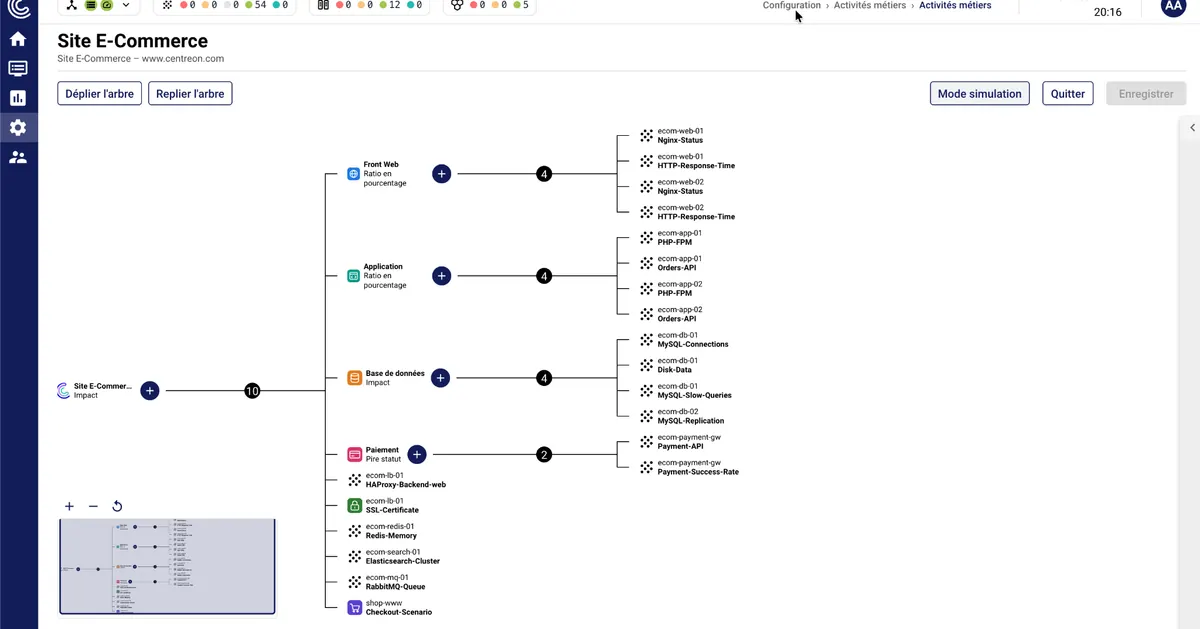
With 26.10, Business Activity Monitoring (BAM) is configured in a single interface and can be tested before it goes live. The goal: model a business application in minutes, not an entire afternoon.
As a quick reminder, BAM groups the technical components monitored in Centreon Infra Monitoring into business activities, such as “E-commerce site,” “Email,” or “Payroll.” Each component carries a different weight in the overall health of the service. If one of the two web servers behind an e-commerce site goes down, the service is degraded. If the database goes down, nobody can place an order, and the service is critical. Your teams fix what actually affects the business first, and you can demonstrate the real availability of your services against your SLAs.
Build your BA impact tree in a single interface
Until now, modeling a business application meant starting from technical indicators and working your way up to the application, jumping from menu to menu without ever seeing the full tree. The new interface flips that around: you start from the application and work your way down. You add nodes, select Key Performance Indicators (KPIs), and set calculation methods and impact propagation rules, all in one place, with the full tree in front of you.
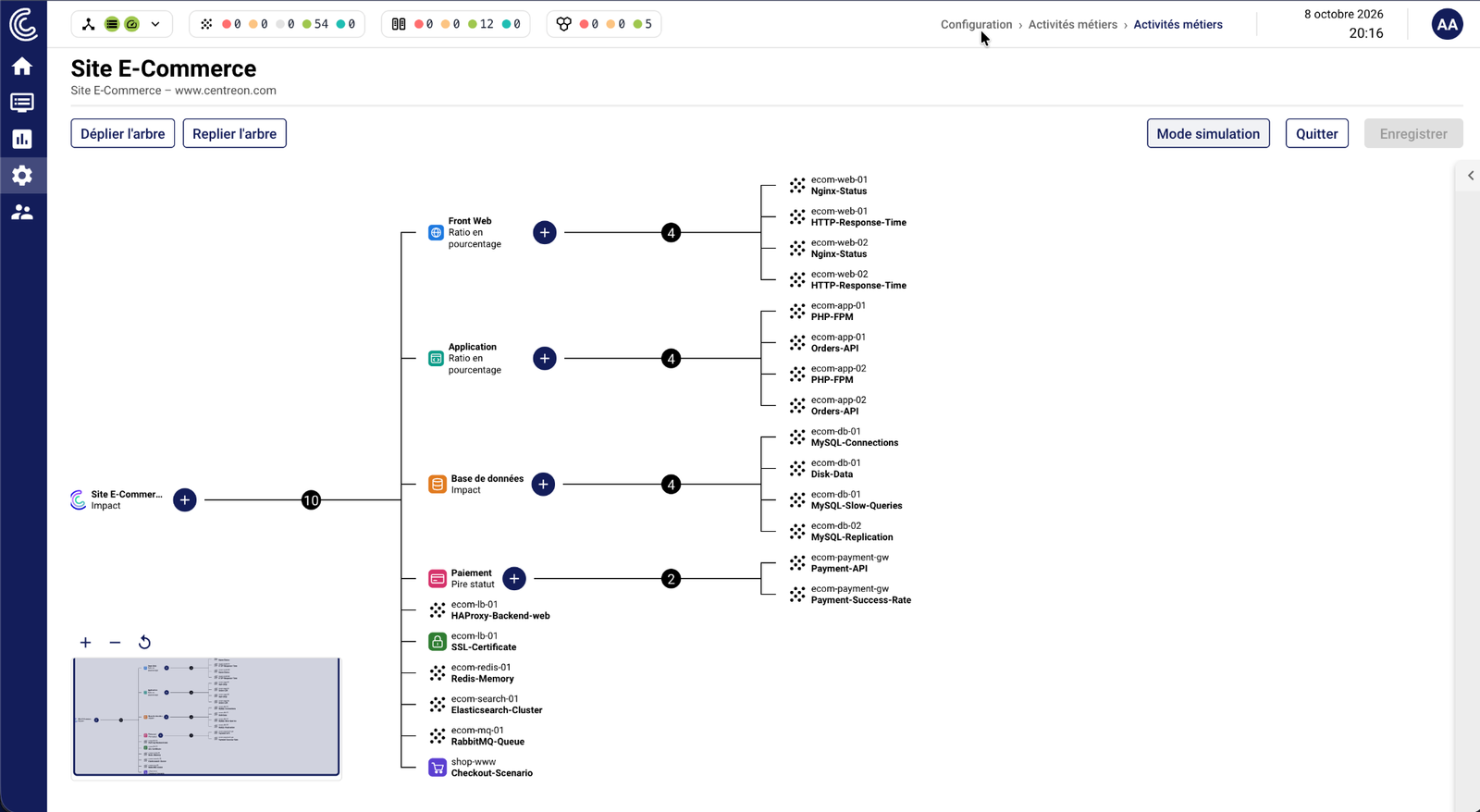
Why it matters: fewer clicks, less back and forth, and a configuration that mirrors the way you think about your application.
A simulator to validate your rules before something breaks
Built in response to a community request, the simulator lets you change the status of KPIs and instantly see how the impact propagates up to the business activity. As you adjust the configuration, the tree updates in real time.
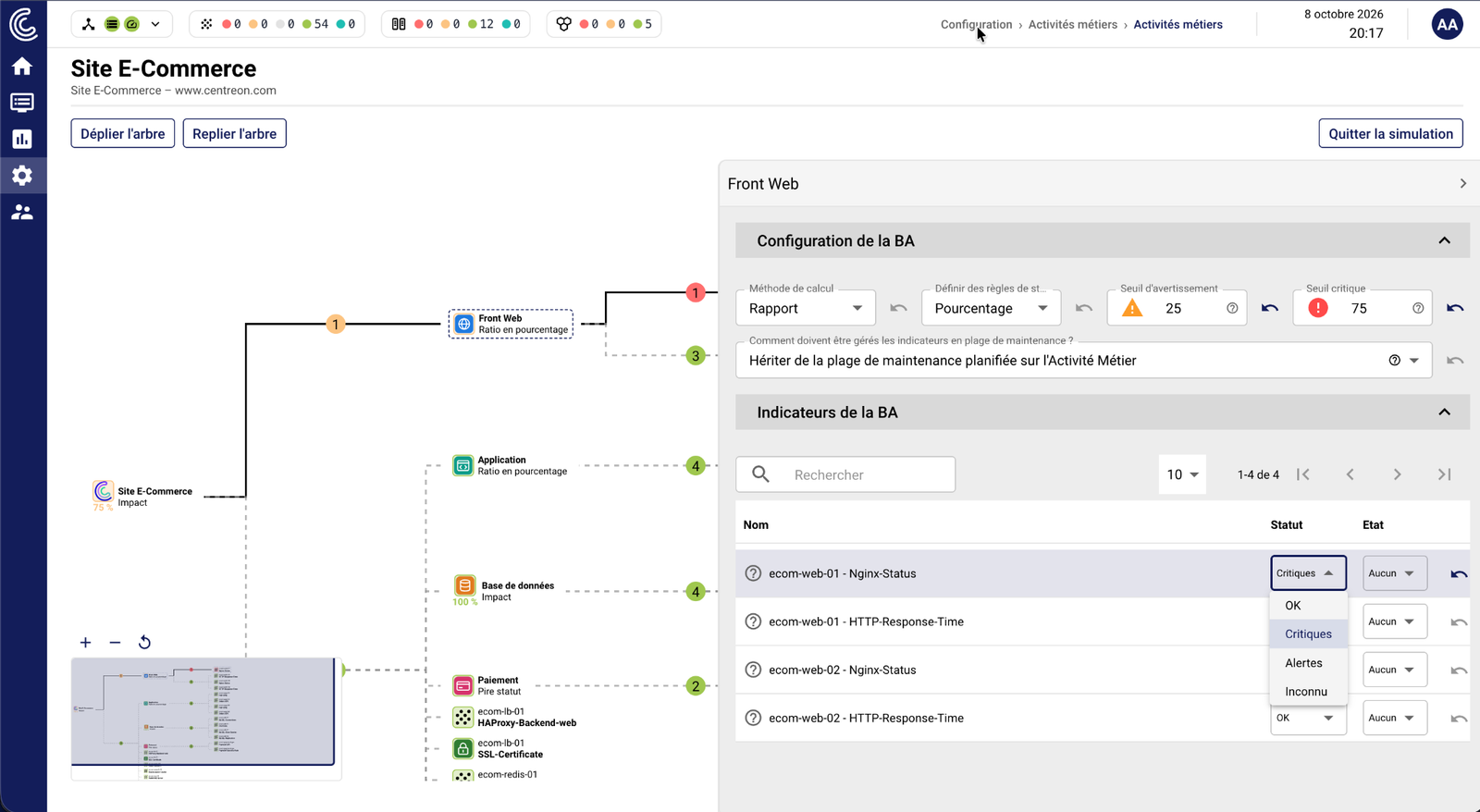
Why it matters: you validate your propagation rules before going live, not in the middle of an incident.
APIs to keep your business activities in sync with your CMDB
A new, fully documented set of APIs comes with these interfaces.
Why it matters: if your business applications are already described in your CMDB or another source of truth, you can automate creating and updating them in Centreon, with no manual re-entry.
Faster real-time insights
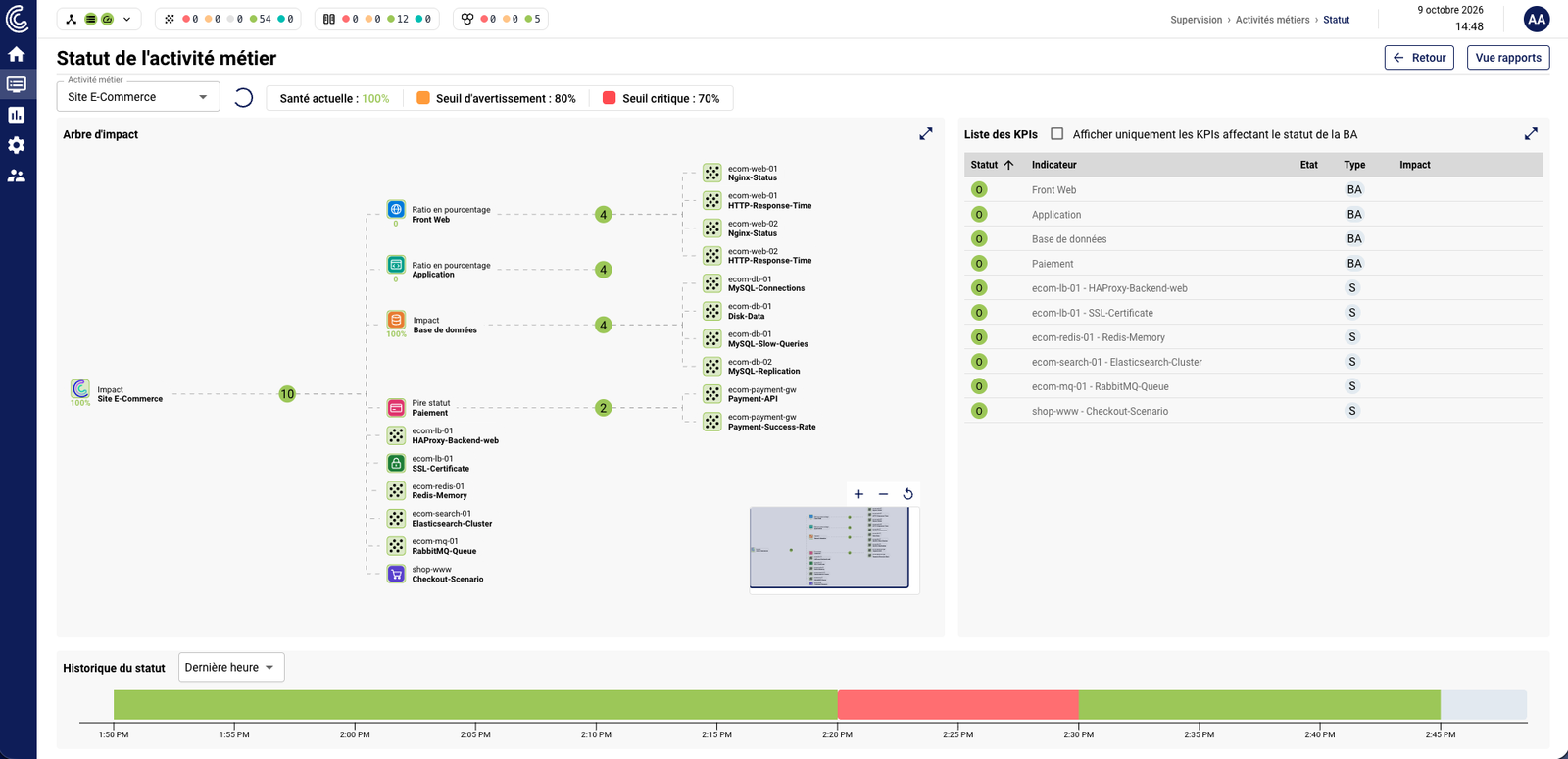
Since 24.10, you can track your business activities in your dashboards, and the tree automatically expands to show only the elements in trouble. Version 26.10 adds icons so you can identify each type of element at a glance, which makes the root cause easy to spot.
Coming soon: business activity history
In an upcoming 26.10 minor release, you’ll be able to review the status and health history of each business activity, along with the indicators responsible at any given moment. It’s ideal for post-mortems and SLA reporting: you’ll finally know why the e-commerce site went critical at 3 a.m. on Saturday.
A refreshed interface and better performance
A new look, aligned with the Centreon Observability Platform
Centreon Infra Monitoring adopts the visual identity of the Centreon Observability Platform: a new header, a new primary color, new resource icons, breadcrumbs built into the header, and several refreshed menus. More screens will follow.
Why it matters: clearer navigation and a consistent experience across Centreon products.
Faster real-time views
With every release, Centreon keeps improving real-time performance. Version 26.10 speeds up dashboards, their widgets, and the Resources Status page.
On the Centreon MAP side, a new option, covered in the documentation, reduces the server’s system resource usage and significantly improves its startup time.
Why it matters: screens that respond faster day to day, even on large platforms, and a lighter MAP server.
Easier report scheduling
Scheduling Centreon MBI reports is now easier to set up, and a new MBI widget adds reporting data to your dashboards. The reporting documentation has also been completely revised to explain the underlying concepts and the objects each report requires.
Integrations and community ideas
A unified observability platform
The Monitoring Connectors catalog brings data from Centreon Log Management and Centreon Experience Monitoring into Centreon Infra Monitoring:
- Log Management: the number of open events by status, and the volume of logs ingested over the last hour for a given query.
- Experience Monitoring: RUM and performance metrics for a website, plus incidents on user journeys, with automatic journey discovery.
Why it matters: these indicators show up on the Resources Status page, trigger alerts and notifications, feed your dashboards and playlists, and enrich your BAM impact trees. You can finally connect your infrastructure, your logs, and your users’ real-world experience.
Your ideas, built in
Several improvements in 26.10 come straight from community requests:
| Improvement | Why it matters |
|---|---|
| Matrix42 provider | Open a Matrix42 ticket directly from Centreon |
| IDs in the Resources Status page CSV export | Easily match exports with your other tools and scripts |
| Notes and Action URL columns in the Resource table widget | Access procedures and actions right from your dashboards |
| Auto Discovery and BAM API documentation | Automate discovery and business monitoring on your own |
| BAM configuration simulator | Test your impact rules before going live |
| Nested macros | Reuse more of your configuration and make it easier to maintain |
Have an idea for the next release? Share it on The Watch, the Centreon community.
What’s next?
A predictable release lifecycle
Centreon ships an LTS release with three years of support in even-numbered years, and a Short Term Support (STS) release with 18 months of support in odd-numbered years. Every release goes through three support phases, each lasting one year for an LTS release:
| Phase | Scope | Centreon Infra Monitoring 26.10 LTS |
|---|---|---|
| Phase 1 | Fixes by severity + minor improvements | October 2026 – October 2027 |
| Phase 2 | Fixes for major and blocking issues | October 2027 – October 2028 |
| Phase 3 | Security fixes | October 2028 – October 2029 |
With the release of 26.10, versions 24.10 and 25.10 move into phase 3. Now is a good time to plan your upgrade: check the release notes and upgrade procedures in the documentation, or contact our professional services team for help.
Join our webinar on November 19
See Centreon Infra Monitoring 26.10 in action and put your questions to our product team during our webinar on November 19. Register for the webinar
New to Centreon Infra Monitoring? Take the Product Tour or Ask for a demo.
FAQ
What is a Centreon Infra Monitoring LTS release?
A Long Term Support release, published in even-numbered years and supported for three years. Centreon Infra Monitoring 26.10 is the second LTS release, following 24.10.
How do I add a poller in Centreon Infra Monitoring 26.10?
From the header, a wizard generates an installation command in a few clicks. Just run it on the target server or in your container environment.
Can I deploy a Centreon poller in a container?
Yes. Version 26.10 lets you install a poller as containers, using an automatically generated Docker Compose file. Updating it is as simple as deploying a new image.
Which connections are TLS-encrypted in 26.10?
All connections to the database, from the central or remote server, Centreon MAP, and Centreon MBI, in addition to connections between pollers and the central server.
Can I test a business activity before it goes live?
Yes. The BAM simulator lets you change KPI statuses and watch the impact propagate through the tree before you start monitoring.