
Cargando el formulario…

Centreon Infra Monitoring 26.10 LTS is here: faster deployment, full TLS encryption, smarter BAM.See what’s newInfra Monitoring 26.10 LTS is here

Vates Technology Monitoring (XCP-ng / Xen Orchestra)

Vates publishes Vates VMS, an open source virtualization platform that brings together the XCP-ng hypervisor and the Xen Orchestra management console. More and more organizations are choosing it as an alternative to VMware. Centreon monitors this stack end to end, alongside the rest of your infrastructure.

OVERVIEW

Understanding the Vates Stack

Vates is a French software vendor, founded more than ten years ago in Grenoble, specializing in open source virtualization. Its two main projects, XCP-ng and Xen Orchestra, cover the entire virtualization chain: from the Xen hypervisor and the XCP-ng virtualization platform to the management and backup of virtual machines with Xen Orchestra. Together, they make up the Vates VMS offering, a complete platform for enterprise virtualized infrastructures. Since Broadcom’s acquisition of VMware, Vates has become an alternative for organizations looking to move away from vSphere. Vates also provides tooling for migrating from VMware, with V2V imports of vSphere workloads into XCP-ng.

The main components of the Vates stack include:

  • XCP-ng: An open source Type 1 or “bare-metal” hypervisor based on the Xen hypervisor. The successor to XCP, originally created as the open source version of Citrix XenServer, it is installed directly on physical servers.
  • XCP-ng pools: Groups of multiple hosts. A “master” host holds the pool’s configuration database (VMs, networks, storage), which is replicated to the other members. All clients communicate with this master through the XAPI API.
  • Xen Orchestra (XO): The centralized management console for XCP-ng, covering host and pool administration, VM lifecycle, storage management, backup and automation. XO is agentless and provides a web interface, a CLI and a REST API.
  • Xen Orchestra Appliance (XOA): The preconfigured version of Xen Orchestra, updated and maintained by Vates.

Why Vates Monitoring is Necessary

A virtualization platform hosts critical services: an incident on a host or a pool affects every VM it runs. Monitoring the Vates stack allows you to:

  • Quickly Detect Incidents: A rise in the number of halted VMs, an overloaded host or a full Storage Repository must be flagged before users are affected.
  • Keep Control of Resources: Tracking host and VM CPU and memory usage, as well as CPU overcommit at the pool level, helps prevent both over-allocation and under-utilization.
  • Anticipate Storage Saturation: A full Storage Repository blocks VM creation, snapshots and backups.
  • Facilitate Diagnosis: Data for each layer (Xen Orchestra, pool, host, VM, storage) helps isolate the root cause of an incident faster.
  • Secure a Migration from VMware: During the transition, both platforms coexist. Monitoring them in the same console lets you follow the switchover without changing tools or alerting processes.
  • Plan Capacity: Historical metrics help forecast host and storage needs.
HOW WE HELP

Our Proposal: Deploying Simplified Integration for your Vates Stack

Centreon offers four monitoring connectors dedicated to the Vates stack. They query the Xen Orchestra REST API: a single access point, with no agent to install on XCP-ng hosts.

ConnectorMonitored resourceVMware equivalent
Vates Xen Orchestra REST APIXen Orchestra management layer and global view of the infrastructurevCenter
Vates XCPng Host REST APIEach XCP-ng hostESXi
Vates Pool REST APIEach XCP-ng poolCluster / Datacenter
Vates VM REST APIEach virtual machineVM

With Centreon, you can:

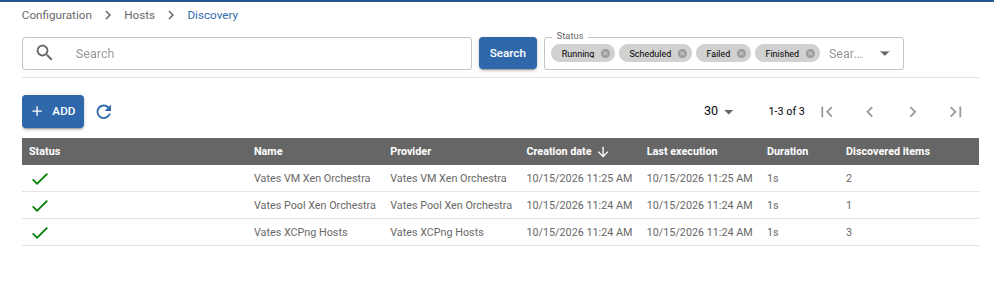
  • Automatically discover hosts, pools and VMs from Xen Orchestra to simplify deployment.
  • Apply standardized monitoring policies to all Vates resources, with the right metrics collected from deployment.
  • View the status and history of your resources in customizable dashboards and the event console.
  • Trigger alerts and automated actions when thresholds are reached.
  • Monitor with a read-only Xen Orchestra account, which the connector can create for you during setup (see the dedicated documentation section).
Centreon host discovery: discovery jobs for XCP-ng VMs, pools and hosts from Xen Orchestra

Automated Monitoring of your Vates Resources with Centreon

The Vates connectors collect status and performance metrics for each layer of the stack. They help answer concrete questions such as:

  • Xen Orchestra: How many VMs are running, halted, paused or suspended across the infrastructure? What is the usage rate and size of each Storage Repository? Storage Repositories can be filtered by name, type, pool or host.
  • XCP-ng host: What is the host’s CPU and memory usage?
  • XCP-ng pool: What is the pool’s CPU overcommit level, i.e. the ratio of vCPUs allocated to VMs to the physical CPUs in the pool?
  • Virtual machine: What is the CPU and memory usage of each VM?

Storage Repositories are automatically discovered as services. XCP-ng hosts, pools and VMs are automatically created in Centreon through host discovery, which queries Xen Orchestra.
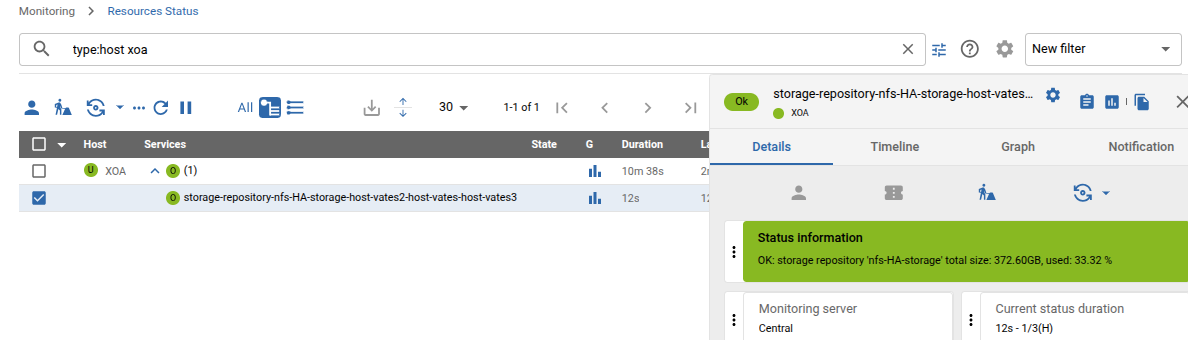
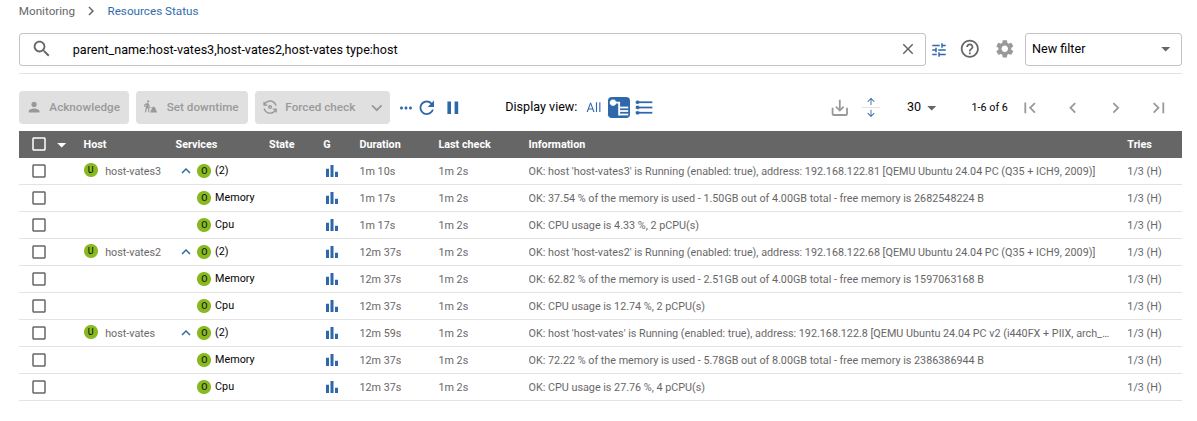
Centreon Resources Status: a Xen Orchestra NFS Storage Repository monitored, with its size and usageCentreon Resources Status: CPU and memory usage of three XCP-ng hosts

Customizable Dashboards

Once Vates metrics are integrated into Centreon, the full range of visualization tools is available:
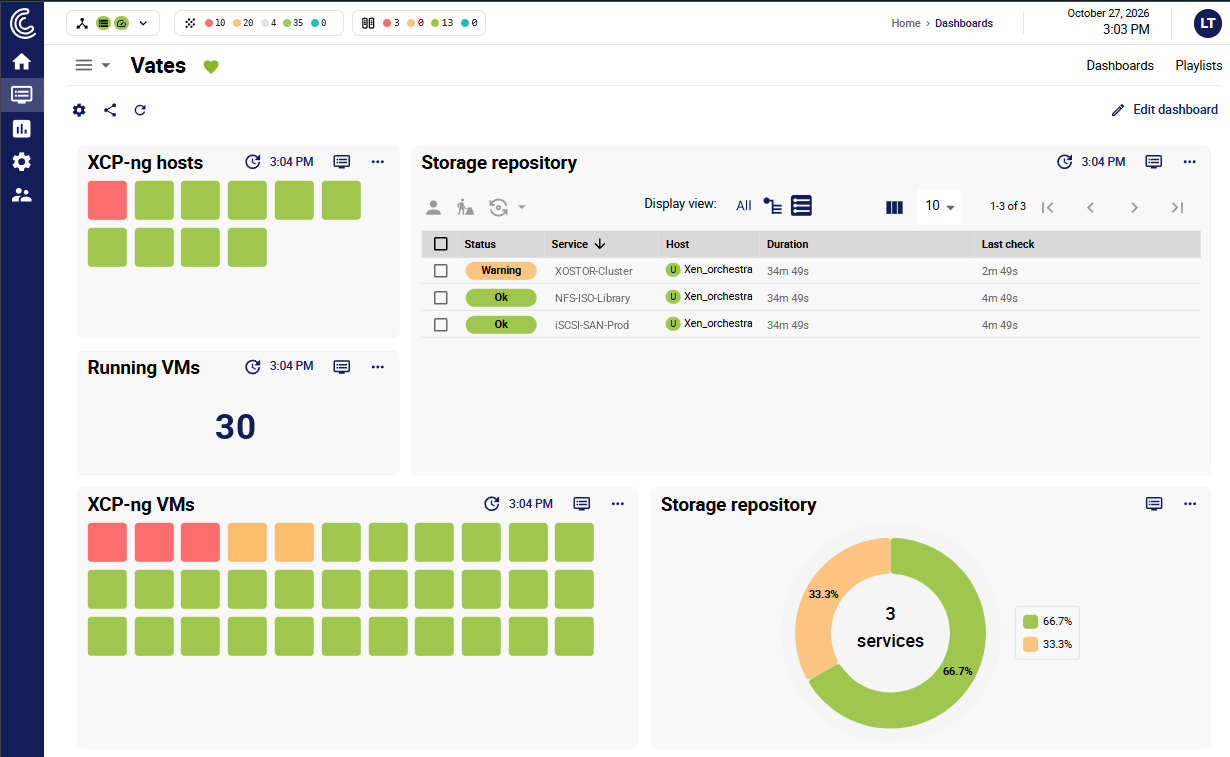
  • Customizable dashboards display key metrics for hosts, pools, VMs and Storage Repositories, in real time and over time.
  • Business Activity Monitoring (BAM) links the status of Vates resources to the business services they host, highlighting critical problems and filtering out less urgent alerts.
  • Service weather maps give operations centers a quick overview of the platform’s health.
Vates dashboard in Centreon: XCP-ng hosts, running VMs, virtual machines and Storage Repositories

Simplified Incident Management and Alerts

In Centreon, you can configure alerts triggered directly by data from the Vates stack, so you can react quickly when an incident occurs:

  • Custom notifications send alerts by email or to tools such as PagerDuty, Slack and Microsoft Teams, to the right teams.
  • Automated actions trigger under defined conditions, for example an abnormal number of halted VMs, a Storage Repository exceeding its usage threshold or a pool in CPU overcommit.

Centreon Benefits for Vates Monitoring

Automatic Discovery

By combining Centreon’s Auto-Discovery with the Vates connectors, new hosts, pools and VMs declared in Xen Orchestra join your monitoring with no manual configuration.

Zero-Config Connectors

Monitor Vates and your entire IT environment: more than 700 zero-config connectors cover your networks, servers, storage, applications and clouds.

Align IT and Business

Centreon aligns IT operations with business objectives through intuitive monitoring.

Vea Centreon en acción

Reserve una demo personalizada con uno de nuestros expertos en monitorización.

Solicitar una demo →